
*This article may contain affiliate links. For full information, please see the disclaimer here.
The quest for language proficiency is an age-old endeavor. From traditional textbooks to immersive language courses, countless methods have been used. But in recent years, language learning apps have emerged as a popular option, promising quick, convenient, and fun language acquisition.
One such app is uTalk, which claims to offer a practical and efficient way to learn a new language. But does it live up to the hype?
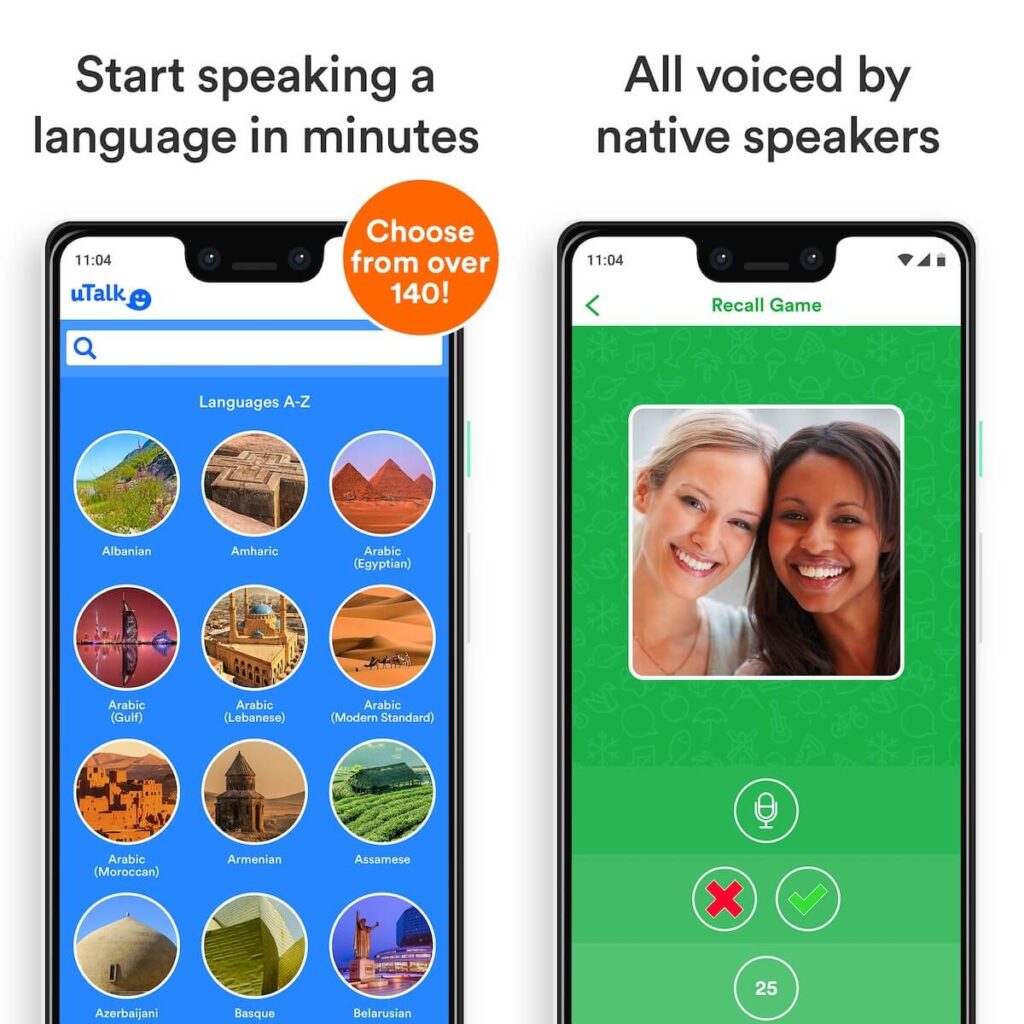
That’s what this uTalk review aims to answer. After trying out this app for the past few months, I can finally tell you about its features, benefits, and whether it can help you master a language. Let’s get to it, shall we?
What is uTalk?
uTalk is a language learning app founded in 1991 as EuroTalk by Richard Howeson and Andrew Ashe. Based in London, UK, the company rebranded as uTalk in 2016, reflecting its move to cater to more languages and not just European ones.
Today, with over 150 languages and dialects available, uTalk caters to a wide range of learners, including those interested in less common languages like Kinyarwanda or Greenlandic.
The app’s course structure is centered around practical, everyday phrases and vocabulary. Learners progress through bite-sized lessons, each focusing on a specific topic like greetings, travel, or dining out.

Each lesson includes audio recordings by native speakers, allowing users to practice pronunciation and listen to natural speech patterns. Interactive exercises, such as matching words to images or translating phrases, reinforce learning. While it doesn’t delve deeply into grammar or written language skills, the platform excels at developing skills needed for real-world conversations.
Here’s a quick look at its key features:
| Number of languages offered | Over 150 languages |
| Learning methods | Interactive exercises featuring audio clips and images; Listening comprehension; Pronunciation practice |
| Course structure | Thematic units such as “first words”, “food and drink”, “social phrases”, etc., with relevant vocabulary items; Each unit has six gamified exercises — phrase practice, speaking game, memory game, easy game, hard game, and recall game |
| Pricing structure | Subscription-based, with various pricing plans and duration options. Check discounted plans here. |
| Free features | Limited access to some languages and features |
| Other features | uCoins (digital coins) can be used to unlock topics; Phrasebook; Offline mode |
| Devices | iOS, Android, desktop |
What languages can you learn with uTalk?

With more than 150 language courses, uTalk has a diverse language selection. From popular languages like Spanish, French, and Mandarin Chinese to lesser-known tongues such as Welsh, Gaelic, and Swahili, uTalk has it.
The app’s extensive language library includes a mix of global and regional languages, allowing you to explore both widely spoken and niche languages. For instance, you can find not just Modern Standard Arabic but also Egyptian, Gulf, Lebanese, and Moroccan Arabic. Even languages that you can’t find on other apps, such as Kannada, Amharic, Catalan, or Basque, are on uTalk.
How much does uTalk cost?
uTalk offers a flexible pricing structure to accommodate various learning needs and budgets. You can choose from monthly, six-monthly, or annual subscriptions.
uTalk’s one-month subscription typically costs $11.99. If you’re signing up for six months, the cost is slightly lower at $10/month. The one-year subscription costs $8.33/month.
Do note that these prices cover only one language. I couldn’t find anywhere how much the all-language subscription costs, but a subscription to another language on top of your first one costs less and varies depending on the language. The French course is cheaper than the Khmer course, for instance.
Within the app, you’ll also find digital coins — uCoins — which you can earn by completing games successfully. These uCoins can be used to purchase topics in another language. A topic costs 40 uCoins. If you have enough coins (at least 2,560 uCoins), you can even buy a whole language course altogether. You can also buy uCoins if you haven’t earned enough yet.
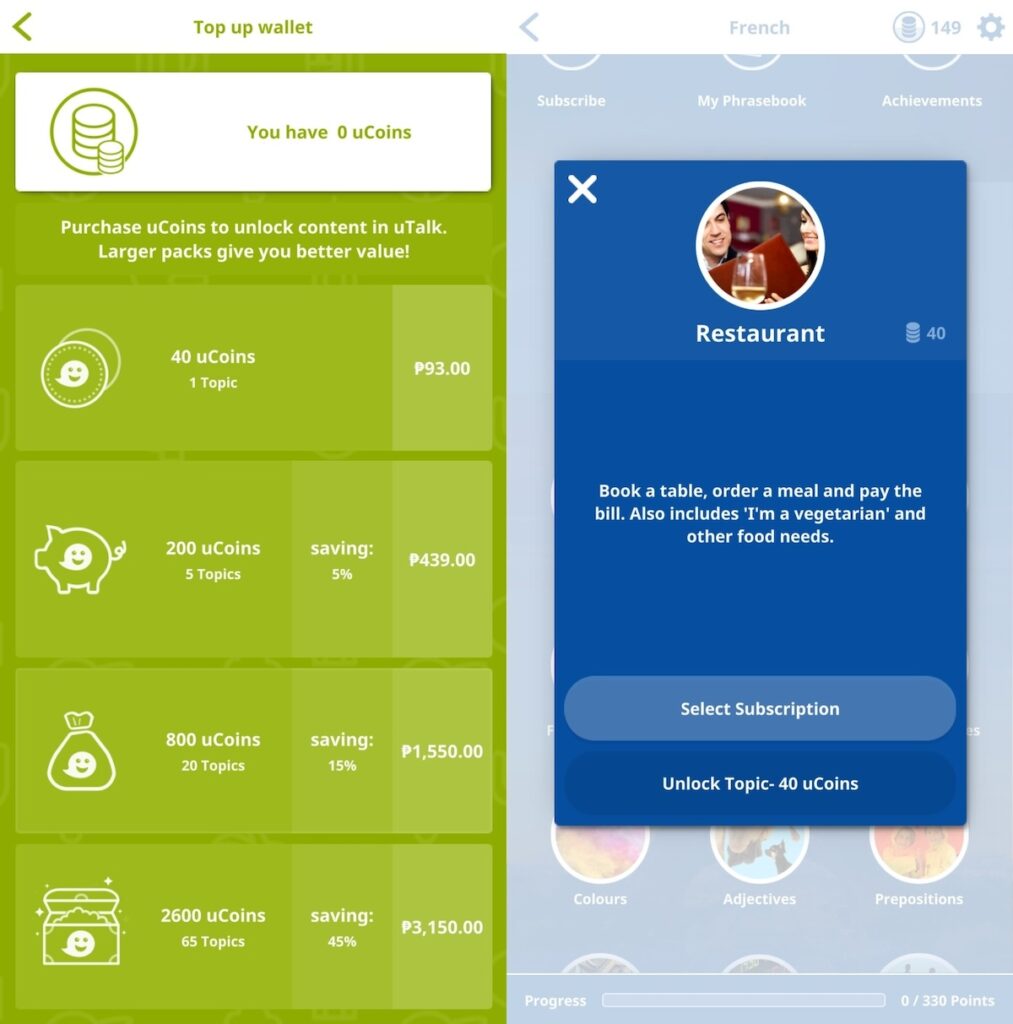
Also, uTalk doesn’t offer a free trial period. But it does have “free starter words” for every language course.
Learning with uTalk
uTalk employs a course structure centered around thematic units, such as “Shopping,” “Leisure,” and “Business.” There are also units dedicated to adjectives and prepositions. Each course has over 60 topics, which are further divided into lessons that introduce 2,500+ vocabulary and phrases through interactive exercises. The course isn’t linear, meaning you can start with any topic you’re interested in.

For this review, I tested uTalk’s Korean course. This course includes a separate unit for learning Hangeul (the Korean alphabet). Another unit called “남한” (namhan, or South Korea) is basically the app’s attempt at including cultural info. Here, you can learn phrases related to Korean culture and traditions, but without their English translations.
uTalk’s exercises include audio clips that teach pronunciation and images to help learners associate words and phrases with visual cues. The audio clips feature native speakers and can be slowed down as well.

Although the interface looks and feels dated (more on this later), uTalk has integrated gamification into the learning process. Various games, such as phrase practice, speaking games, memory games, easy games, hard games, and recall games, challenge learners in different ways. Here’s how each game works:
- Phrase Practice: This game helps users practice common phrases by repeating after the native speaker audio.
- Speaking Game: This game lets you record a phrase, after listening to the native speaker audio. Once you’ve recorded all the phrases, you will be asked to match the audio with the right picture.
- Memory Game: This game tests users’ vocabulary and memory skills by challenging them to match words with their corresponding images within a time limit.
- Easy Game: This game is like the memory game, but it presents simple words and phrases.
- Hard Game: This game challenges users with more complex language structures and vocabulary.
- Recall Game: This game tests users’ ability to recall vocabulary and phrases through visual cues. After recording your answer, you will hear the correct answer and be able to check and compare your pronunciation.

In addition to these interactive games, uTalk offers a Phrasebook feature that allows users to quickly look up and practice specific words and phrases, and save favorite words and phrases. The app also includes an offline mode, enabling you to learn on the go, even without an internet connection.
What I love about uTalk
uTalk is just one of the many apps I’ve tried in the last year or so. Some of these apps are also gamified, so I have to admit that I came in with some expectations. Keep reading to know whether uTalk met those expectations or not, but for now, here are the things I love most about this app.
Practical vocabulary
uTalk places a strong emphasis on vocabulary expansion. But you don’t just learn random words; the app actually focuses on practical vocabulary, equipping you with the language skills you need for real-world situations.

Most of the thematic units on uTalk cover words and phrases that you can use in daily conversations or when traveling. The non-linear structure also means you can start with any unit and learn vocabulary that interests you or you find useful. For instance, if I want to prepare for a short trip to Seoul, I can prioritize learning phrases related to traveling, directions, transport, shopping, and food.
I also like that there’s a dedicated unit for Korean culture-specific phrases.
Native speaker audio
One of the coolest things about uTalk is that it uses native speaker audio. This means you get to hear how real people actually speak the language, with all the nuances and accents. While it’s not quite like having a personal, native-speaking language tutor, it’s close. At the very least, the audio clips don’t sound robotic.
This proves especially helpful for improving your listening comprehension. By listening to native speakers, you’ll get used to the rhythm and flow of the language. You’ll also learn to pick up on subtle sounds and intonation patterns that you might miss in textbooks. Not to mention that it’s just more fun to learn a language when you can hear it spoken naturally.
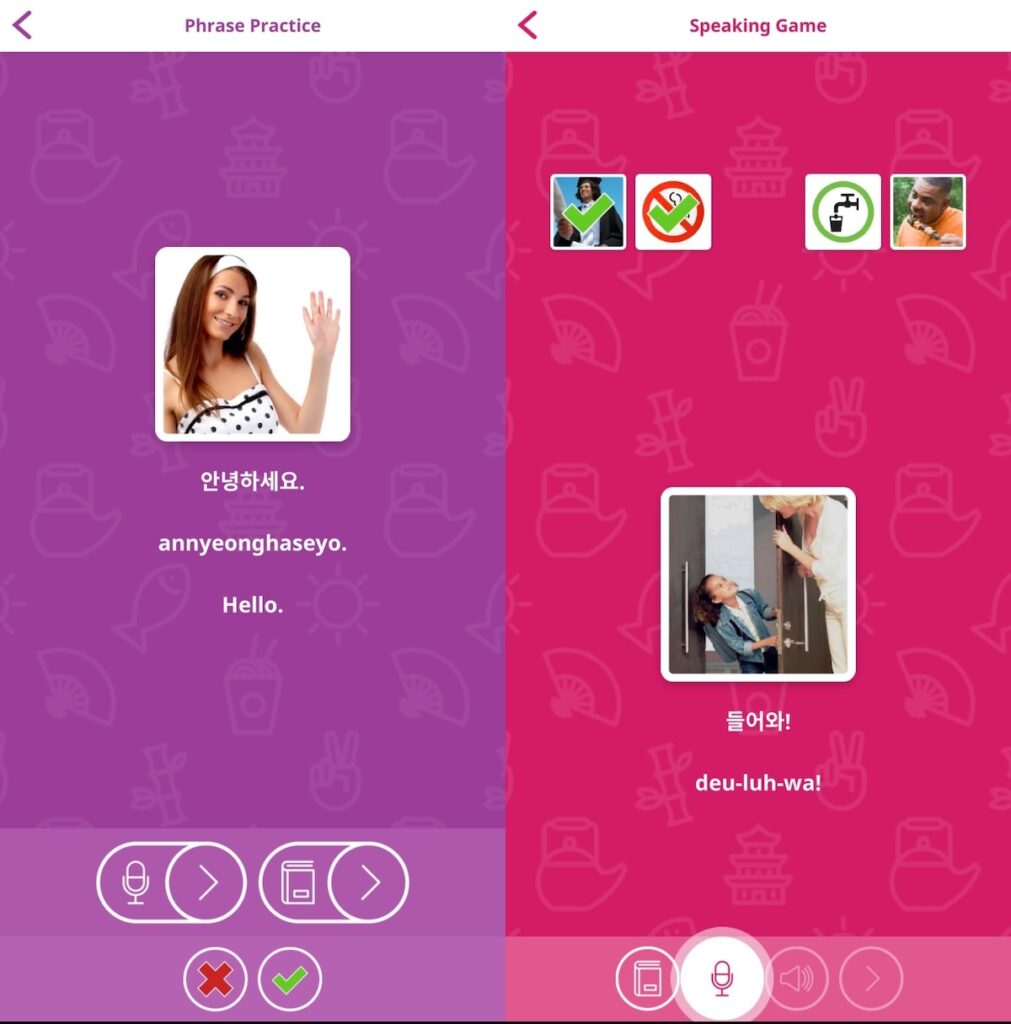
uTalk doesn’t have a speech recognition program, which is a bummer, but it does have a built-in voice recorder. The app lets you record yourself saying the phrase, and then you’ll be able to compare your voice with the native pronunciation. While this feels old-school, the self-guided approach requires accountability. You can easily skip an item even if you’re not quite nailing the pronunciation, but then who’s losing out?
Extensive language selection
Another great thing about uTalk is that it offers a huge variety of languages. Whether you’re dreaming of traveling to Italy, learning Mandarin for work, or just curious about Swahili, you’ll find it on uTalk. Cliché as it sounds, it’s like having a whole world of languages at your fingertips!
From the most popular languages like Spanish and French to lesser-known tongues like Welsh and Belarusian, uTalk’s extensive language library has something for everyone. If your goal is to be a polyglot or learn languages that you might not even find in traditional language courses, uTalk is the perfect app for you.
Flexible learning and offline access
I mentioned that uTalk uses a non-linear thematic approach. Basically, you don’t have to follow a strict, linear path through the lessons. You can jump around, focus on what interests you most, and learn at your own pace. This flexibility helps make learning feel less like a chore.
Also, uTalk’s Phrasebook feature lets you save your favorite phrases and access them quickly, whether you’re traveling, chatting with a language partner, or just practicing on your own. This means you can focus on remembering words that matter to you the most.

And let’s not forget the offline mode. You can download lessons and practice anytime, anywhere, even without an internet connection. This is perfect for long flights, commutes, or those moments when you just want to learn without distractions.
Some areas for improvement
While I think uTalk has a lot of merits, some things hindered me from fully enjoying it.
Repetitive exercises
uTalk offers great features but I did find that some of the exercises can get a bit repetitive. Sometimes, it felt like I was doing the same thing over and over again, which can be a bit boring. The games, despite being called different names, feel like more of an iteration of each other.
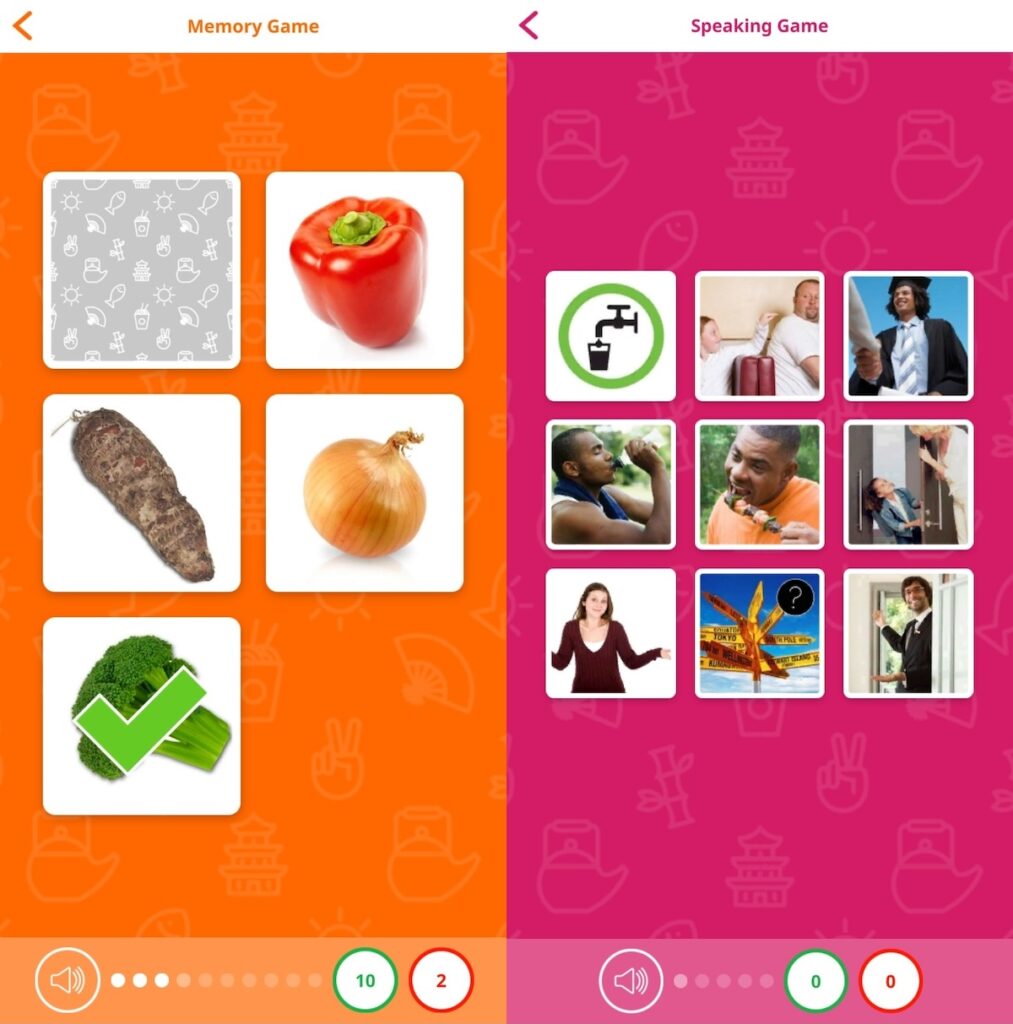
It would be nice to see more variety in the exercises, maybe with more challenging activities or different formats. Incorporating more cultural insights and language tips would also add depth to the learning process and make it more engaging.
Also, while the lack of a speech recognition engine isn’t a deal-breaker, I think it would be helpful to get solid feedback on pronunciation. This way, learners know exactly where they have to improve.
No grammar instruction
One thing I noticed is that uTalk doesn’t really focus on grammar. While it’s great for learning practical phrases and improving your listening comprehension, it doesn’t dive deep into the structure of the language. If you’re someone who likes to understand the “why” behind the language, you might find yourself wanting more.
It would be really helpful if uTalk could include some basic grammar explanations. Even short, concise explanations could go a long way in helping learners understand how the language works. This would make it easier to form new sentences and express yourself more confidently.
Unappealing UI

While uTalk has a lot to offer in terms of language learning content, the user interface could definitely use a refresh. The current design feels a bit outdated, reminiscent of websites from the 90s, which can be a bit off-putting for younger users who are used to modern and interactive interfaces.
A more modern and visually appealing interface would make the learning experience more enjoyable and engaging. The app could benefit from a cleaner layout, more intuitive navigation, more gamified elements, and a more visually appealing color scheme.
My verdict: Is uTalk worth it?
Considering everything I’ve broken down in this uTalk review, is uTalk worth using? For learners who want to expand their vocabulary and improve their listening comprehension, absolutely! The app’s practical content immerses you in real-world language while the use of native speaker audio helps you to understand accents and natural speech patterns.
While you might have to do a bit of self-assessment when it comes to your pronunciation, again, it’s not a deal-breaker for me. The app’s focus on practical language skills is what truly shines. Plus, if you’re interested in more niche languages, uTalk has you covered.
However, uTalk might not be the best fit for everyone. If you’re looking for a deep dive into grammar or if you’re easily bored by repetitive exercises, you might want to explore other options. Additionally, if you’re a fan of sleek, modern UIs, uTalk’s somewhat outdated design might not be your cup of tea.
Ultimately, whether uTalk is the right choice for you depends on your individual learning style and goals. If you’re looking to boost your vocabulary and improve your listening comprehension, uTalk is definitely worth checking out.
FAQ about uTalk
Will uTalk make you fluent?
While uTalk is a fantastic tool for building vocabulary and improving listening comprehension, it won’t make you fluent on its own. Achieving fluency requires consistent practice, immersion in the language, and often, additional learning resources to delve deeper into grammar and cultural nuances.
Is uTalk better than Duolingo?
uTalk and Duolingo both use gamification to make learning fun, but they have different strengths. Duolingo offers a more interactive experience with diverse exercises, while uTalk excels in practical vocabulary and improving listening comprehension through native speaker audio. The best choice depends on your learning style and goals.
Check our recommended language learning apps and resources here.
What languages does uTalk offer?
uTalk offers a wide range of languages, from popular choices like Italian, German, and Mandarin Chinese to less common tongues such as Azerbaijani, Burmese, and Serbian. This diverse selection caters to various interests and learning goals, making uTalk a versatile language learning tool.
How much does uTalk cost?
uTalk offers flexible pricing plans. You can choose from monthly, six-monthly, or annual subscriptions. A monthly subscription typically costs $11.99 but this varies depending on the number of languages included. Longer-term subscriptions often come with discounts. For the most accurate pricing, check uTalk’s official website.
Does uTalk offer a free trial?
uTalk doesn’t offer a full-fledged free trial. However, they do provide a few free starter words for each language, giving you a taste of the app’s features and content. This allows you to explore the language of your choice and decide if it’s a good fit for your learning style.
Can you use uTalk offline?
Yes, you can use uTalk offline! Simply download the lessons and topics you want to learn, and you can practice anytime, anywhere, without an internet connection. This makes it perfect for travel or any situation where you might not have access to Wi-Fi.